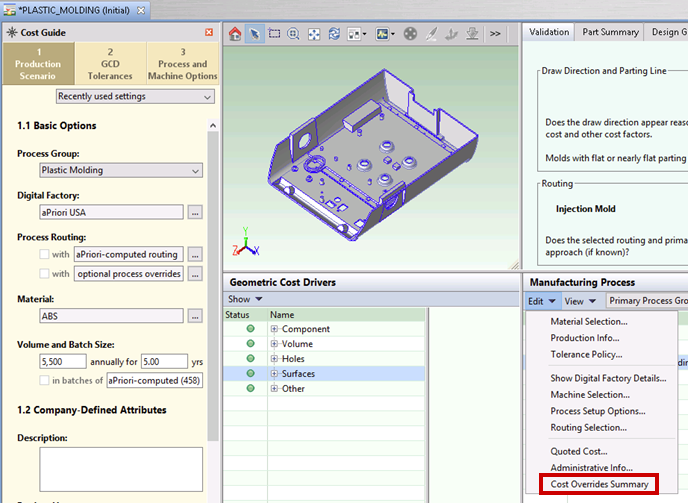
To view all the overrides for the current scenario, select Edit > Cost Overrides Summary from the Manufacturing Process pane:
The Cost Overrides Summary dialog lists all the overrides together with the original default values, if there were any:
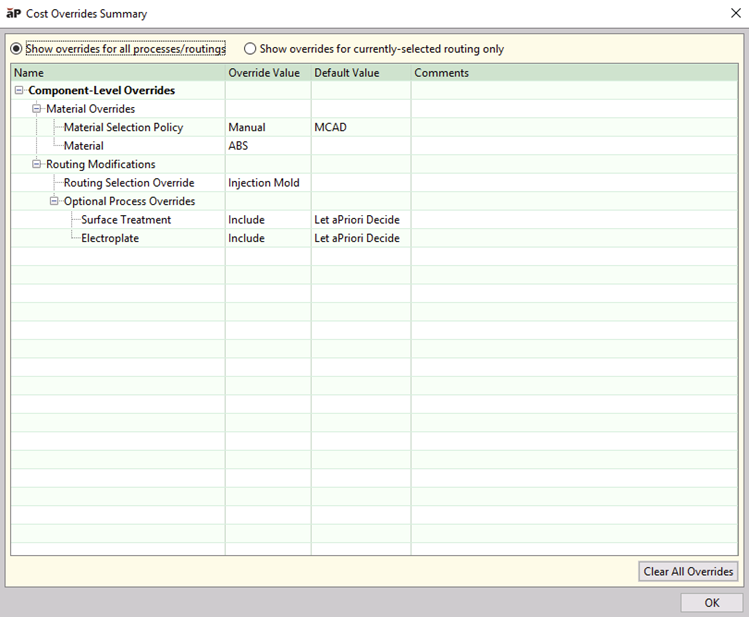
The top of the dialog has two selections:
-
Show overrides for all processes/routings.
-
Show overrides for currently selected routing only (last costed routing).
The dialog summarizes the many different types of inputs and overrides you may have when costing a component, and enables you to revert all or selected overrides:
-
Overridden fields in the Cost Summary, Part Details, and Assembly Details tabs.
See Overriding computed values. -
Material selections
If a user explicitly selected a material rather than using the default material for the Digital Factory.
See Material selection. -
Routing selections
If a user explicitly selected a routing rather than allowing aPriori to auto-select the routing based on lowest cost.
See Selecting a Process Routing. -
Machine selections
If a user explicitly selected a machine rather than using the one chosen automatically by aPriori.
See Selecting a machine for an operation. -
Feasibility rule overrides
If the user unchecked the box indicating the system should apply the default process and machine feasibility rules.
See Selecting a Process Routing. -
Process Setup Option settings
If the user edited the default setting for any process setup options.
See Editing process setup options. -
Tolerance and Roughness settings
If the user explicitly specified any tolerance or roughness values.
See Specifying or importing tolerance and roughness values. -
GCD Properties such as indicating a hole is threaded.
See Editing values in the GCD properties table . -
Production inputs if your installation has been configured to automatically map CAD properties.
See Costing using CAD properties .
Note: In addition to organizing and summarizing these many types of inputs and overrides, the Cost Overrides Summary dialog also enables you to undo (revert) all or selected overrides.
Override options